The Dreametech L10s Ultra, a Robot Vacuum That Finally Empties Itself

Hardware · Purchased March 4, 2023 · $1,012.78 via Amazon

Dreametech L10s Ultra Robot Vacuum
Photo: Dreametech

The Setup

An all-in-one robot vacuum/mop combo with a self-emptying, self-mop-washing/drying, self-water-refilling dock. It uses AI-powered navigation with a camera and structured light for obstacle detection and recognition across dozens of environment and obstacle types.

The Review

The hands-off maintenance is the whole selling point and it delivers — auto-empty, auto-mop-wash, auto-refill, all handled without me touching it for weeks at a time. Obstacle detection is solid, and the app is genuinely good with Alexa/Google Assistant support. The dock itself is large and needs real floor space, and I’ve had a couple of mapping hiccups on my cluttered main floor.

What I Liked

  • Genuinely hands-free maintenance
  • Solid obstacle detection/avoidance
  • Flexible cleaning modes
  • Good app with smart-assistant support

What I Didn’t

  • Large dock needs real floor/closet space
  • Premium price
  • Occasional mapping hiccups in cluttered areas

The Verdict

Rating: 4/5

Where to Buy

Sony’s PSVR2: A Genuinely Great Headset Tethered to a Genuinely Annoying Cable

Hardware · Purchased February 22, 2023 · $918.27 via EbGames

Sony PlayStation VR2
Photo: GameStop

The Setup

Launch day. I lined up a PSVR2 the moment EbGames opened on February 22nd, and immediately followed it with a small pile of launch titles (more on those in separate posts). The headset has dual OLED panels, eye tracking, inside-out tracking with no external cameras needed, and the Sense controllers with adaptive triggers and haptics.

The Review

The display is sharp enough that I stopped noticing the screen-door effect within an hour, and the eye tracking genuinely changes how some games render and play. The Sense controllers with their adaptive triggers are the best VR controllers I’ve used. The single tether cable, though, is a constant low-grade annoyance — there’s no wireless option, and I’ve caught it on my chair more than once mid-session.

What I Liked

  • Sharp OLED panels with strong HDR
  • No external tracking cameras to set up
  • Eye tracking enables genuinely novel gameplay
  • Sense controllers feel excellent

What I Didn’t

  • Wired only — no wireless option
  • Can feel front-heavy on long sessions
  • Smaller launch library than I’d like

The Verdict

Rating: 4/5

Where to Buy

An Xbox Rechargeable Battery Pack, Finally Ditching AAs

Hardware · Purchased January 20, 2023 · $32.47 via Amazon

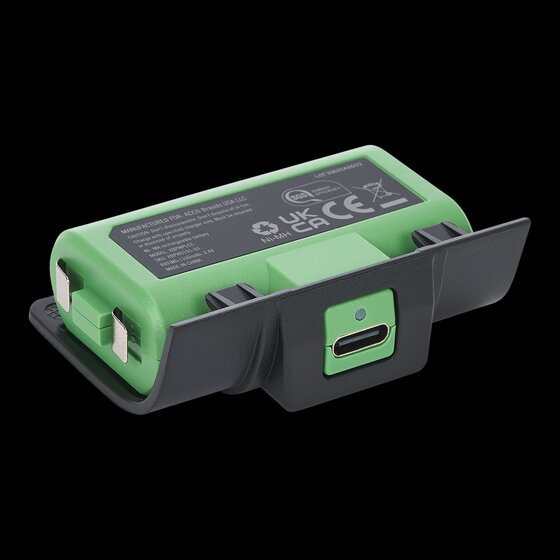
PowerA Rechargeable Battery Pack for Xbox
Photo: PowerA

The Setup

An officially licensed rechargeable battery solution that replaces AA batteries in an Xbox Series X controller via a swappable battery door, charged over USB-C. I’d been burning through AAs for long enough that this felt overdue.

The Review

Simple drop-in swap for the AA door and decent battery life for casual play, at a more affordable price than some third-party charging-dock bundles. Capacity is noticeably lower than higher-end rechargeable packs, and you do have to pop the controller open to swap the door and battery — a charging cable/dock is sold separately from the bare pack, which feels like a minor cash grab.

What I Liked

  • Officially licensed, simple drop-in swap
  • Decent battery life for casual play
  • Affordable, convenient USB-C charging

What I Didn’t

  • Lower capacity than higher-end third-party packs
  • Requires opening the controller to swap the door/battery
  • Charging dock/cable often sold separately

The Verdict

Rating: 3/5

Where to Buy

TP-Link’s AX3000 Range Extender, Fixing My Wi-Fi Dead Zone for Under $120

Hardware · Purchased January 15, 2023 · $119.86 via Amazon

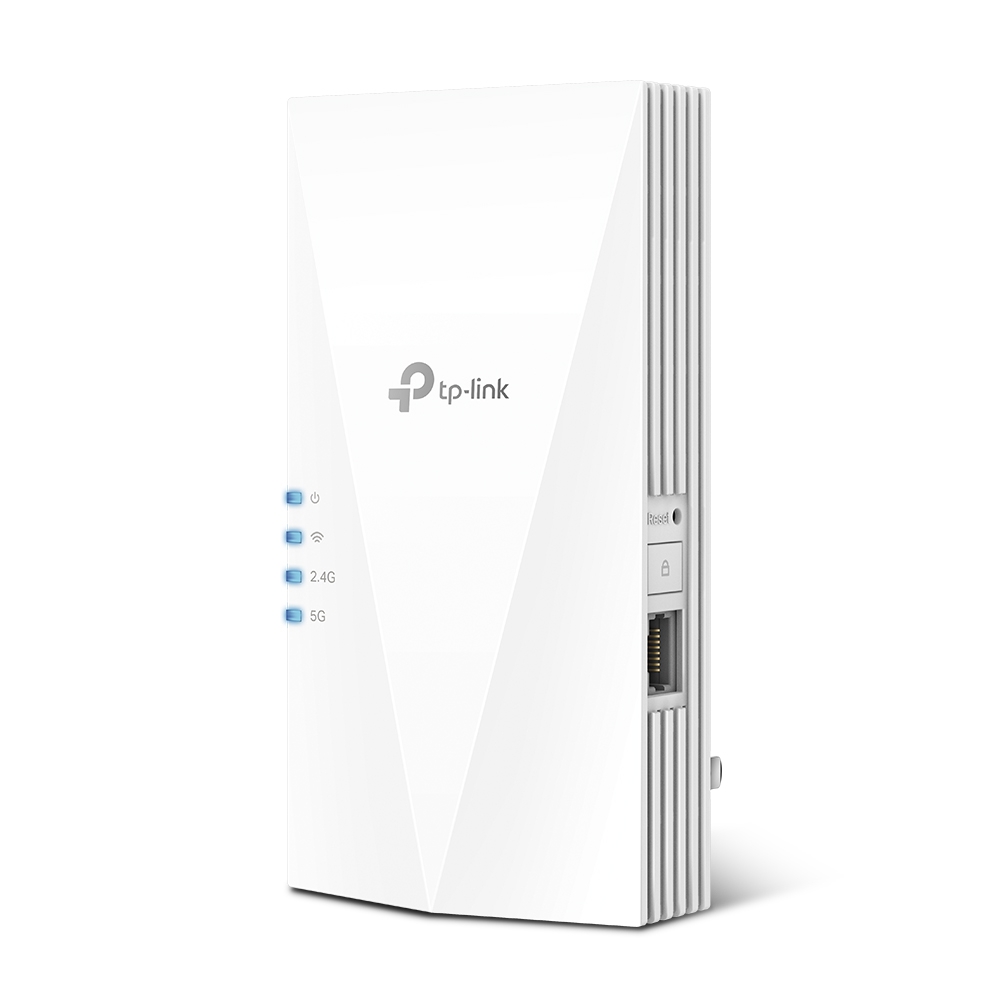
TP-Link AX3000 WiFi 6 Range Extender (RE700X)
Photo: TP-Link

The Setup

A plug-in dual-band Wi-Fi 6 range extender (the RE700X) with a Gigabit Ethernet port, OFDMA, beamforming, and OneMesh compatibility for extending my existing TP-Link router’s network into the one corner of the house that always struggled for signal.

The Review

It solved the dead zone immediately, and setup through the TP-Link Tether app was painless. OneMesh support means devices roam between the router and extender without me thinking about it most of the time. Like any extender it roughly halves throughput on the extended segment, and placement took a bit of trial and error to find the sweet spot.

What I Liked

  • Solid Wi-Fi 6 speed/range boost for the price
  • Easy app-based setup
  • OneMesh gives near-seamless roaming
  • Compact plug-in design

What I Didn’t

  • Roughly halves throughput on the extended segment
  • Placement is finicky — needs a decent signal from the router first
  • Some devices need to manually reconnect when moving between zones

The Verdict

Rating: 4/5

Where to Buy

LG’s 34″ UltraWide: One Cable to Rule the Whole Desk

Hardware Review · Purchased December 14, 2022 · $769.68 CAD via Amazon.ca

LG 34WQ75C-B UltraWide curved monitor
LG 34WQ75C-B UltraWide. Photo: LG

The Setup

LG’s 34WQ75C-B, a 34″ curved 21:9 IPS panel at 3440×1440 QHD resolution, 60Hz, HDR10, with a 96W USB-C port that handles video, data, and laptop charging over a single cable, plus a built-in KVM switch.

The Review

The single-cable USB-C setup is the feature that sold me, and it delivers exactly as promised — one cable handling video, data, and 96W of charging means my laptop docks and undocks from this monitor in seconds with none of the usual cable juggling. The ultrawide format itself is genuinely useful for side-by-side multitasking in a way that’s easy to underestimate until you’ve actually used one, and the stand’s full range of height, tilt, and swivel adjustment plus VESA mounting covers pretty much any desk setup.

At around 110 PPI, the pixel density is noticeably softer than a 4K display at a similar size, and the panel caps out at 60Hz with no variable refresh rate, so this is squarely a productivity monitor rather than anything built for gaming. 300 nits typical brightness also struggles a bit in a brighter room. For the specific job of getting more usable desktop space with one clean cable to a laptop, though, it’s a genuinely strong, accessible option.

What I Liked

  • 96W USB-C powers most laptops through a single cable
  • Ergonomic stand with full height, tilt, and swivel adjustment plus VESA mounting
  • Ultrawide format is genuinely useful for multitasking at an accessible price
  • Built-in KVM switch is a nice bonus for a multi-device desk

What I Didn’t

  • ~110 PPI is noticeably softer than a comparable 4K display
  • Capped at 60Hz with no variable refresh rate — not built for gaming
  • 300 nits typical brightness struggles in bright rooms

The Verdict

Rating: 4/5

An easy pick for anyone wanting genuine multitasking real estate with a single cable to a laptop — just not a gaming monitor.

Where to Buy

A Second Lighting Kit: Same Idea, Different Store

Hardware Review · Purchased December 15, 2022 · $50.00 CAD via Michaels

The Setup

A second LED lighting accessory kit, this time picked up at Michaels rather than ordered online — the same general category as the Light My Bricks-style kit from a few days earlier, meant to add illumination to another LEGO City build.

The Review

Grabbing this one in-store rather than online meant no waiting on shipping, which was genuinely convenient this close to Christmas, though the trade-off is a less set-specific kit than the online options — it’s a more generic LED string-light setup rather than something engineered to snap precisely into a particular model’s window layout the way the online kit was.

It still does the basic job of adding some warm glow to a display, just with more manual positioning and improvising required to get the lights where I actually wanted them, compared to the more purpose-built kit. For a quick, in-person pickup with no shipping wait, it’s a reasonable stopgap; for a cleaner, more precise result, ordering a set-specific kit online is still the better call.

What I Liked

  • Available in-store with no shipping wait
  • Still adds a nice warm glow to a display
  • Flexible enough to use on more than one type of set

What I Didn’t

  • Less set-specific than a purpose-built kit — more manual positioning required
  • Less clean, precise result than the online kit purchased earlier

The Verdict

Rating: 3/5

A convenient last-minute stopgap, but the purpose-built online kit from a few days earlier is the better way to do this.

Where to Buy

  • Check your local Michaels craft store’s LED lighting section

Light My Bricks: The Kit That Finally Made My LEGO City Glow

Hardware Review · Purchased December 9, 2022 · $88.44 CAD via Amazon.ca

The Setup

A third-party LED lighting kit — LEGO doesn’t make these itself, so this almost certainly came from Light My Bricks, the dominant brand in this space on Amazon.ca — designed to snap into a LEGO City set and add illuminated windows and streetlight effects that the set doesn’t come with out of the box.

The Review

This is the kind of accessory that punches way above its price once it’s actually installed — a static LEGO City building suddenly looks like a scene rather than a model the moment the windows light up, and the effect is genuinely more impressive in person than it sounds on paper. The kit itself is well-organized and the LED runs are the right length for the set it was designed for.

Installation is fiddly — threading tiny LED wires through a completed build takes patience, and in a couple of spots I had to partially disassemble sections I thought were finished to route wires properly. It’s not a difficult job, just a slow, careful one. Once it’s in, though, it’s a genuinely transformative upgrade for the price, and it’s made me want to go back and retrofit some of my older City sets too.

What I Liked

  • Genuinely transforms a static set into a lit-up scene
  • Well-organized kit with correctly sized LED runs
  • Great value for the visual impact it adds

What I Didn’t

  • Fiddly installation that sometimes requires partial disassembly
  • Routing tiny LED wires through a finished build takes real patience

The Verdict

Rating: 4/5

A fiddly install, but a genuinely transformative upgrade for any LEGO City set — worth the patience it takes to fit.

Where to Buy

Polk’s Monitor XT30 Center Channel: The Unglamorous Speaker Doing the Most Work

Hardware Review · Purchased November 18, 2022 · $321.54 CAD via Amazon.ca

Polk Monitor XT30 center channel speaker
Polk Monitor XT30 center channel. Photo: Polk Audio

The Setup

A compact center channel from Polk’s budget-to-midrange Monitor XT line, built around a 1″ Terylene dome tweeter and dual 5.25″ bilaminate woofers, Hi-Res Audio certified and Dolby Atmos/DTS:X compatible. Its whole job is dialogue — sitting below the TV and carrying every line of speech clearly in a home theater setup.

The Review

Nobody buys a center channel for excitement, but this one does exactly the unglamorous job it’s supposed to do — dialogue comes through clean and clear even at lower volumes, which is the actual metric that matters for a speaker whose entire purpose is making sure you don’t miss a line. The compact cabinet fits neatly below my TV without fighting for space the way a taller speaker would, and it integrates cleanly with the rest of the Monitor XT lineup and my AVR without any fuss.

It’s genuinely light on low-mid punch on its own, which isn’t a surprise for a speaker this size, and it benefits from being crossed over around 100Hz or higher so a subwoofer can pick up the slack. In a room with harder, more reflective surfaces it can also edge toward bright or harsh at higher volumes. None of that matters much given what a center channel is actually for — it’s not meant to be the star of the system, and this one is a genuinely solid, unremarkable-in-the-best-way choice for that role.

What I Liked

  • Clear, focused dialogue reproduction even at low volumes
  • Compact cabinet fits neatly below the TV
  • Integrates cleanly with other Polk Monitor XT speakers and a mainstream AVR
  • Strong price-to-performance for a budget/midrange home theater setup

What I Didn’t

  • Limited low-mid bass punch without a subwoofer
  • Can sound slightly bright in rooms with hard, reflective surfaces
  • Not built for large rooms or reference-level volume

The Verdict

Rating: 4/5

Exactly what a good budget center channel should be — unremarkable in the best possible way, and it does its actual job well.

Where to Buy

GeForce RTX 3090: Finally Winning the Scalper Lottery

Hardware Review · Purchased September 30, 2022 · $1,752.18 CAD via Amazon.ca

Nvidia GeForce RTX 3090 graphics card
GeForce RTX 3090. Photo: Nvidia

The Setup

Nvidia’s Ampere-generation flagship, launched all the way back in September 2020 with 10,496 CUDA cores, 24GB of GDDR6X VRAM, and a 350W TGP. Buying one in September 2022 means buying it two years late and at the tail end of the worst GPU shortage in recent memory — crypto miners and scalpers kept 30-series pricing well above MSRP for most of its life, and it took the Ethereum mining crash earlier this year to finally bring prices down to something resembling sane.

The Review

Even two years on, this is still an enormous amount of GPU. The 24GB of VRAM is honestly overkill for most gaming, but it means genuinely comfortable headroom for 4K and even 8K with DLSS, plus real utility for anything creative or productivity-related that actually uses that pool. At 4K it demolishes basically everything I’ve thrown at it, and the cooler manages to keep noise reasonable given the performance tier it’s competing in.

None of that changes the fact that this is a genuinely poor value proposition if you’re gaming at 1080p or 1440p — the gap over the cheaper RTX 3080 barely shows up at those resolutions. The 350W power draw meant a PSU upgrade was non-negotiable, and the dual/triple-slot cooler is a hard no for any small-form-factor build. Buying it two years after launch, well past the shortage’s worst point, is really the only way this purchase makes financial sense at all.

What I Liked

  • Still the fastest consumer GPU available to me at 4K and beyond
  • 24GB VRAM gives genuinely comfortable headroom for demanding workloads
  • Cooling keeps noise reasonable for the performance tier
  • Bought well after the worst of the shortage-era pricing finally cooled off

What I Didn’t

  • Poor value at 1080p/1440p — only really makes sense at 4K and up
  • 350W power draw forced a PSU upgrade
  • Massive cooler rules out small-form-factor builds entirely
  • Two years late to the party by the time I actually got one

The Verdict

Rating: 4/5

Genuinely excellent at 4K, and only worth it now that the shortage-era pricing has finally settled down.

Where to Buy

Philips Hue Lightstrip: The Small Purchase That Finally Justified the Sync Box

Hardware Review · Purchased August 22, 2022 · $470.00 CAD via Amazon.ca

Philips Hue White and Color Ambiance Lightstrip
Hue White and Color Ambiance Lightstrip. Photo: Signify

The Setup

A flexible, cuttable, extendable-to-10m LED strip delivering up to 1,700 lumens and 16 million colors with tunable white from 2000-6500K, running standalone over Bluetooth or through a Hue Bridge for full smart-home integration. Bought specifically to actually put the Sync Box from a couple weeks earlier to real use.

The Review

This is the piece that made the whole Hue ecosystem investment click into place. Run behind the TV and synced through the Sync Box, the color and brightness range genuinely elevates movie and game nights in a way that’s hard to go back from once you’ve seen it. The strip itself is easy to cut and extend to fit the exact space behind the TV, and having it work over Bluetooth alone (no Bridge required) makes it approachable even before you commit to the wider smart-home setup.

The full sync effects and multi-room automation do need the Bridge to unlock properly, which is an additional cost on top of an already-expensive strip, and the adhesive backing is showing some early signs of losing grip in a warmer spot behind the TV. It’s IP20-rated, so indoor-only use is a hard requirement, not a suggestion. Between this, the Sync Box, and the earlier Bridge purchase, the total cost of “a light strip” ended up being a lot more than the strip itself — but the end result, finally fully assembled, is genuinely great.

What I Liked

  • Full 16-million-color range plus tunable white
  • Works standalone over Bluetooth, no Bridge strictly required to start
  • Cuttable and extendable to fit an exact space
  • Finally gives the Sync Box something worth syncing

What I Didn’t

  • Full sync effects and automation still require the Bridge as an added cost
  • Adhesive backing shows early signs of weakening in a warm spot
  • Indoor-only (IP20) with no flexibility on that

The Verdict

Rating: 4.5/5

The piece that finally made the whole Hue ecosystem purchase worth it — expensive as a system, but genuinely great as a finished setup.

Where to Buy